Procedural Packed Texture Generator: thousands of animated sprites from one texture lookup
An interactive tool that generates packed RGBA textures for GPU-driven particle effects. Each circle carries its own UV space, unique ID, and radial gradient - one texture sample gives a shader everything it needs to animate thousands of independent elements.
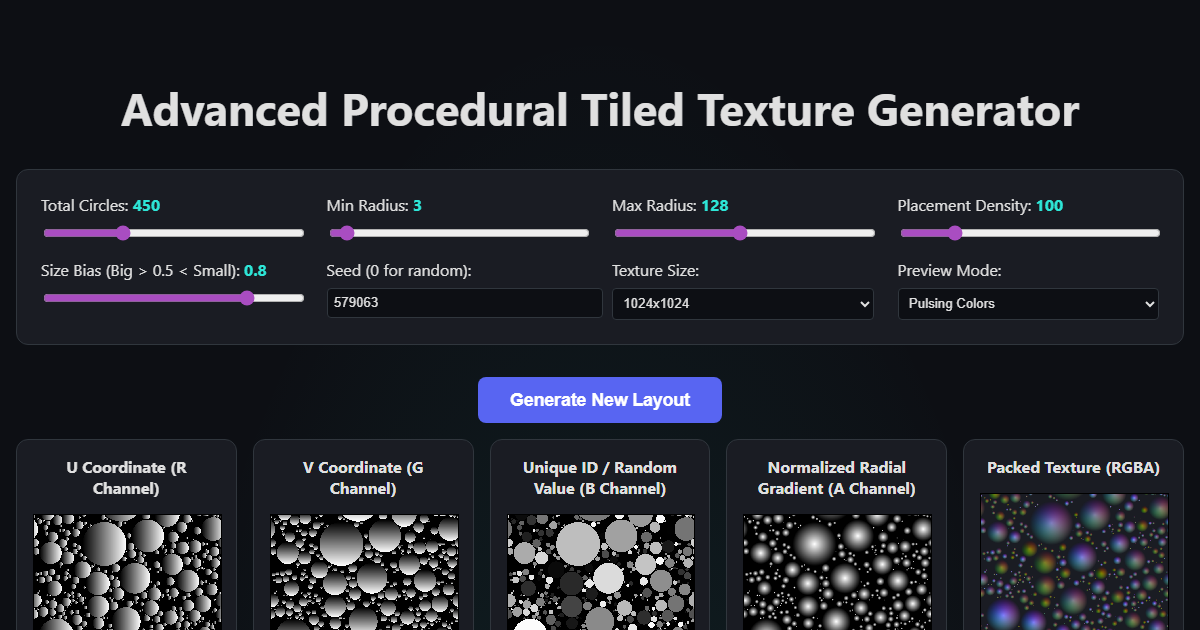
I saw TUATARA’s post showing a technique where a single RGBA texture encodes enough data to render thousands of independent animated circles in a shader. No instancing, no geometry, no draw call overhead. Just one texture lookup per pixel and you’ve got position, identity, and shape.
I built an interactive web tool that generates these textures and previews them live with WebGL.
The trick: data in color channels
The core idea is that this texture doesn’t store color - it stores spatial data. Every pixel inside a circle knows where it is relative to its circle’s center, which circle it belongs to, and how far from the edge it is:
| Channel | Data | Range |
|---|---|---|
| Red | Local U coordinate | 0.0 (left) → 1.0 (right) |
| Green | Local V coordinate | 0.0 (top) → 1.0 (bottom) |
| Blue | Unique circle ID | Random 0.0 → 1.0 |
| Alpha | Radial gradient | 1.0 (center) → 0.0 (edge) |
This means every circle has its own UV coordinate system. A shader can sample a sprite texture using those UVs and it gets mapped onto each circle independently. The Blue channel seeds per-circle variation - different colors, animation timing, rotation. The Alpha channel defines shape and enables soft edges via smoothstep.
Circle packing algorithm
The layout uses greedy placement with growth:
- Pick a random position, check overlap against all existing circles (including 9 tiled copies for seamless wrapping)
- If no overlap, place a circle at minimum radius
- Grow it one pixel per step until it hits a neighbor or reaches its target size
- A 1px gap is enforced between all circles so they never quite touch
Size Bias controls the distribution - at 0.8 (default), the algorithm tries large circles first and fills gaps with small ones, giving an organic look. The whole layout seamlessly tiles because every collision check wraps across edges.
What you can do in a shader
The live preview has 6 demo modes showing different techniques all driven by the same packed texture:
Pulsing Colors - the simplest demo. Use the ID as a hue in HSV color space. Animate the gradient threshold with a sine wave to make circles pulse in and out.
1
2
3
vec3 color = hsv2rgb(vec3(id, 0.8, 1.0));
float pulse = sin(time + id * 6.28) * 0.5 + 0.5;
float mask = smoothstep(0.0, 0.05, gradient - (1.0 - pulse));
Eyeball Texture - maps a procedurally generated eyeball image onto every circle using the R/G UVs. Each eye looks in a different direction (sin/cos offset by ID), blinks independently (UV squash on Y axis), and has a slight random rotation. This is the proof that per-circle UV mapping actually works.
Spinning Wheels - converts UVs to polar coordinates, draws procedural spokes using sin(angle * numSpokes), and rotates them over time. The ID determines spin direction and speed, so half the wheels spin clockwise and half counter-clockwise.
Lava Bubbles - each circle runs on its own lifecycle timer: fract(time * speed + id). Bubbles grow from nothing, reach full size, then “pop” into a fading ring. The gradient channel controls the visible size at each lifecycle phase.
Radar Screens - polar coordinate sweep line with a phosphor decay trail (exp(-angleDiff)). Concentric range rings, crosshair lines, and blips that flash when the sweep passes over them. CRT scanline effect on top.
Matrix Code - divides each circle’s UV space into a 4x4 character grid, scrolls rows, and uses hash functions to select which procedural glyph segments are visible. Lead characters are white-green, trailing ones fade to dark green.
The bugs I shipped (and fixed)
The original version had three bugs that were driving me nuts:
Red flash. The WebGL render loop started before the texture was uploaded. An uninitialized WebGL texture reads as (0,0,0,1) - full alpha, zero ID. The shader interpreted every pixel as belonging to a circle with id=0, which maps to red in HSV. Worse, the animation math had a periodic case where smoothstep(-0.02, 0.0, 0.0) = 1.0 let background pixels through even after the texture loaded.
Fix: early discard when gradient < 0.004 before any animation logic, plus initializing the texture with (0,0,0,0).
Corrupted circle edges. When uploading a <canvas> element to WebGL via texImage2D, the browser silently premultiplies alpha. At circle edges where the gradient (alpha) is small, the U/V/ID data channels get multiplied toward zero. The shader then reads garbage values for those edge pixels.
Fix: build a raw Uint8Array of the packed data and upload it directly with UNPACK_PREMULTIPLY_ALPHA_GL = false, bypassing the canvas entirely.
Lingering weird pixels. Same root cause as above - premultiplied alpha corrupting the data at sub-pixel boundaries.
Try it
tront.xyz/spheres - runs entirely in the browser, no dependencies. Click any generated texture to download it as PNG. Switch preview modes with the dropdown.
The packed texture works in any engine. Sample it, extract the channels, and you’ve got a coordinate system for thousands of sprites in a single texture lookup.
Links: